SMS Messaging Program
Effective date: 2026-08-11
Last updated: 2026-08-26
This page describes the text messages LoSo sends, who receives them, how consent is obtained, and how to stop them. It is published by Loop Social LLC, 4030 Wake Forest Road, STE 349, Raleigh, NC 27609, United States.
1. Program name and purpose
LoSo Invitations. LoSo is an app for discovering and organizing local events. A LoSo user can invite specific people from their phone's address book in one of two ways:
- Event invitations. When a user hosts or shares an event, an invited person who does not have the LoSo app receives a single SMS containing the sender's name, the event, and a link to view and RSVP.
- App invitations. A user can invite a contact to join LoSo itself. That person receives a single SMS containing the sender's name and a link to the app.
- Confirmation codes. When you enter your own phone number — to RSVP to an event on our website, or to sign in — we text you a one-time code to confirm the number belongs to you. Confirmation codes are delivered through a separate verification service and may arrive from a different number than the one invitations come from.
- Event updates. Once you have confirmed your number and RSVP'd to an event, we text you reminders about that event and updates the host sends about it, such as a time or location change. These are currently delivered in the LoSo app rather than by text; text delivery for this category is not yet switched on.
These are the only categories of text message LoSo sends through this program. We do not send marketing, promotional, or advertising messages, and we do not send messages to purchased, rented, or third-party lists. The only messages that recur are event reminders and host updates, and only for an event you RSVP'd to after confirming your own number — see Sections 3 and 4.
2. Who receives messages
Either a phone number you entered yourself — to RSVP to an event or to sign in — or a number a LoSo user individually selected from their own device address book for a specific event they are hosting or sharing, or to invite that person to the app.
Invitations are triggered by a user tapping "Send"; confirmation codes are triggered by you submitting your own number. Reminders and host updates go only to numbers confirmed by the person who owns them. We never send to a number on our own initiative, and we never message a list we did not receive one number at a time.
3. How consent is obtained
There are two ways a number enters this program, and they work differently.
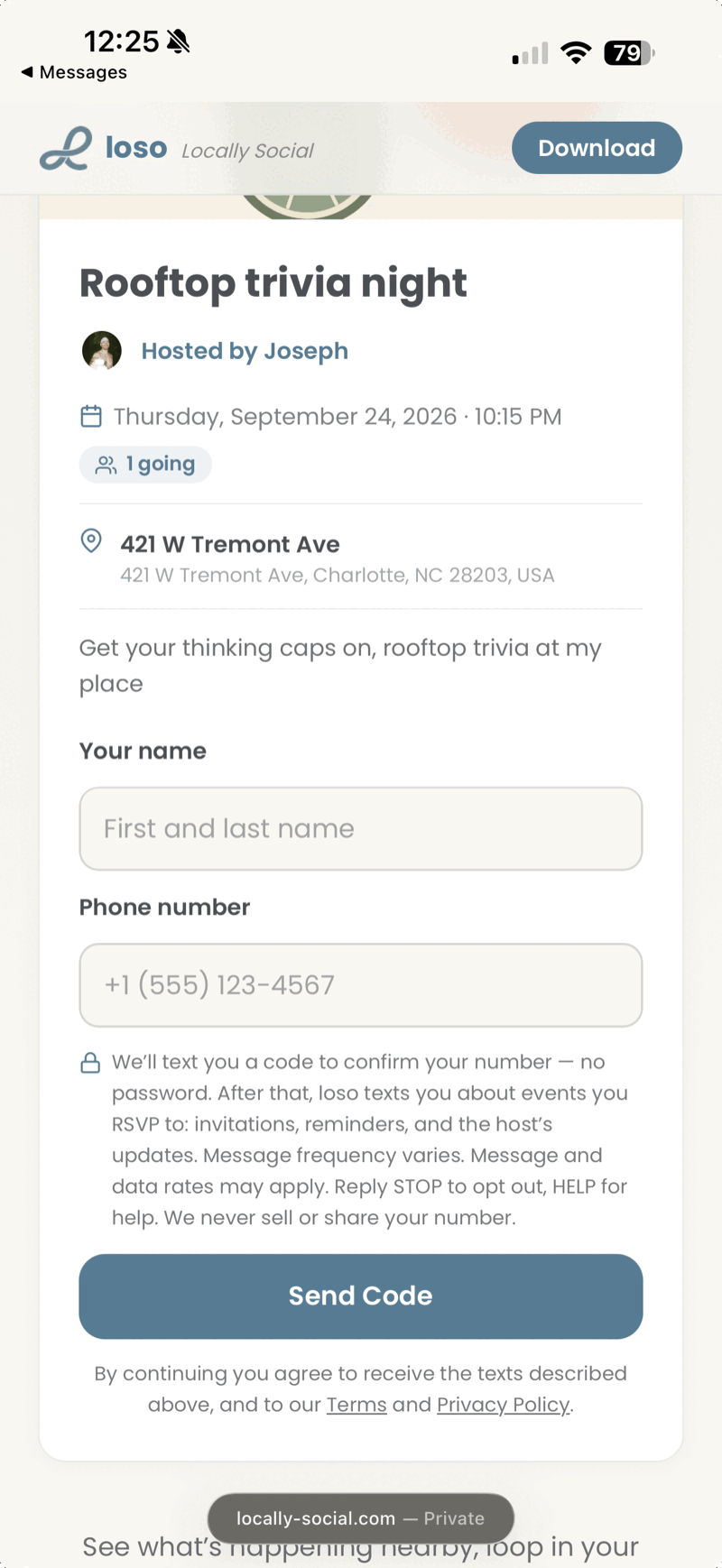
You enter your own number. This is how consent is given for every recurring message we send. To RSVP to an event on our website you type your name and mobile number into a form. Before you submit it, the page tells you that we will text you a confirmation code, that we will afterwards text you about events you RSVP to — invitations, reminders, and updates from the host — that message frequency varies, that message and data rates may apply, and that you can reply STOP to opt out or HELP for help, with links to these Terms and this Privacy Policy. Submitting sends a one-time code; entering that code confirms both your number and your consent, and we record the date and the version of the terms in effect at that moment. Reminders and host updates are sent only to people who have completed this step. A screenshot of this form is in Section 7 below.
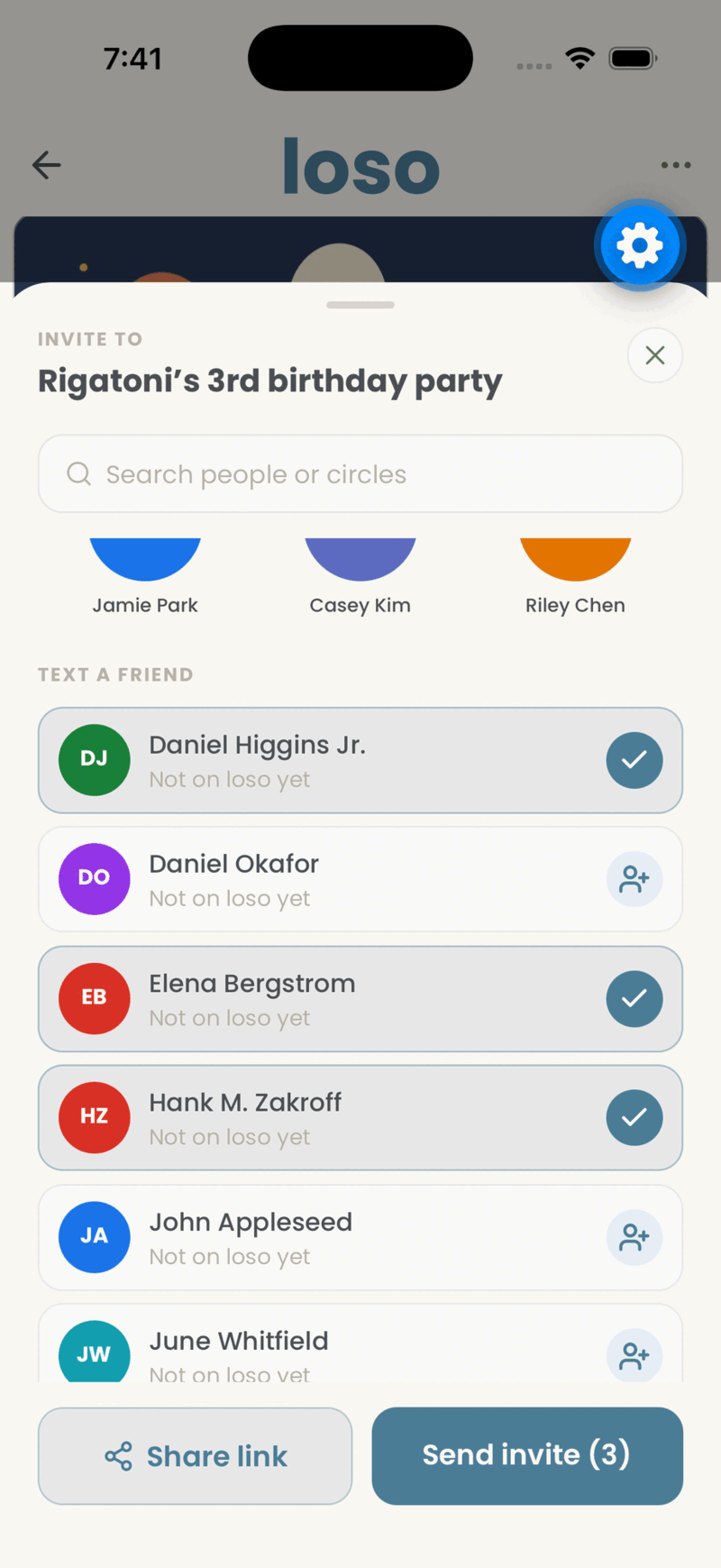
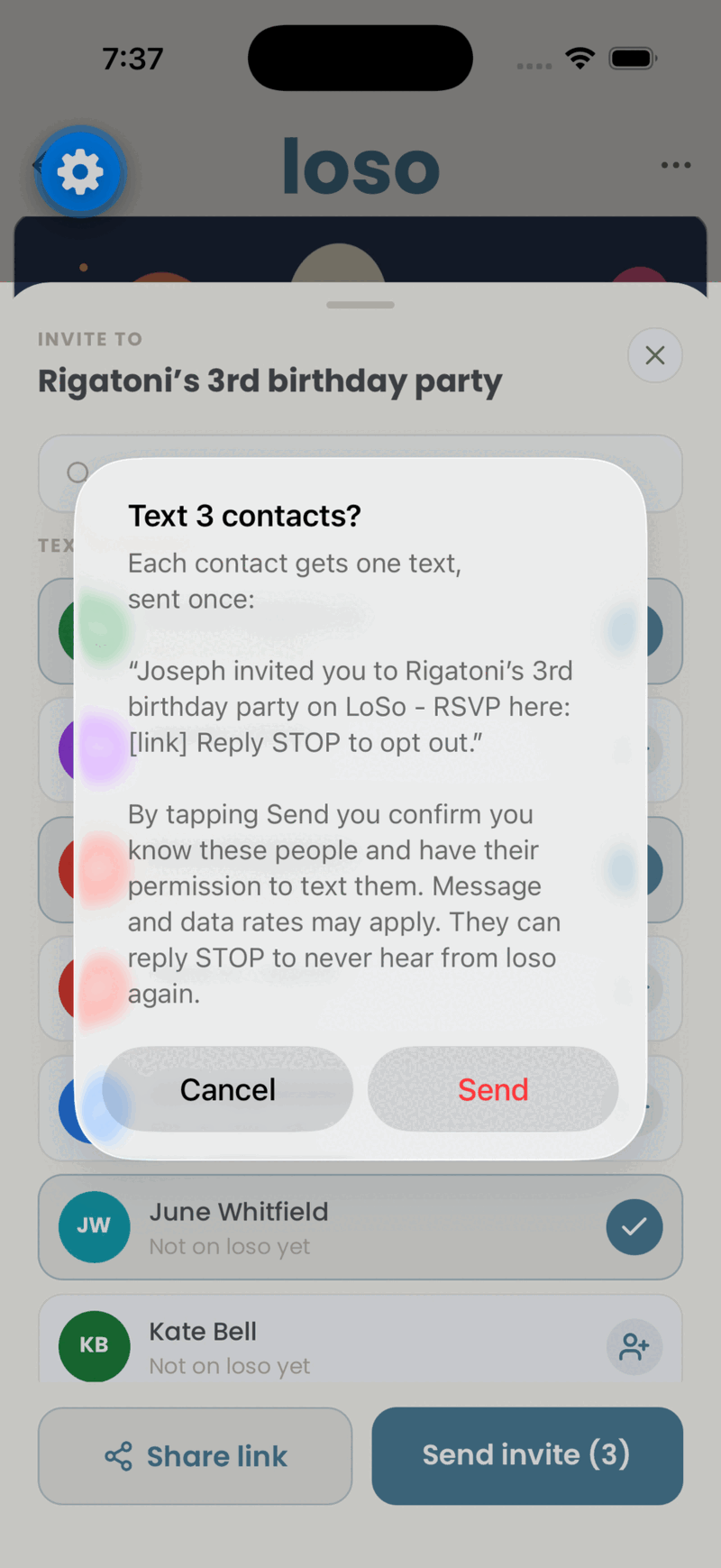
Someone invites you. The single message that starts the above — a first invitation — is sent by an individual LoSo user to a person they chose from their own phone's address book, for a specific event. Consent for that one message is obtained from the sender, at the moment they send it. Before it goes out, the app presents a confirmation screen that:
- shows the exact text that will be delivered;
- states the number of contacts who will receive it;
- requires the user to affirm that they know these people and have their permission to text them;
- discloses that message and data rates may apply; and
- discloses that recipients may reply STOP.
The user must tap "Send" on that screen to proceed. Screenshots of this flow are in Section 7 below.
If you receive an invitation you did not want, reply STOP and you will not be contacted again. You do not need a LoSo account to do that.
Our Terms of Service additionally prohibit users from texting anyone they do not personally know or who has asked not to be contacted, and we terminate accounts that violate this.
4. Message frequency
One message per invitation, and — if you do not have a LoSo account — at most one invitation every 30 days. There is no drip sequence, and no follow-up or reminder message to a phone number that has not confirmed itself.
If you have confirmed your number and RSVP'd to an event, you also receive reminders and updates for that event. Message frequency varies and depends on how many events you RSVP to and how often a host posts an update; updates stop when the event is over. As noted in Section 1, this category is delivered in the app today and not yet by text.
The 30-day limit is enforced on our side, per recipient and across all senders: once any LoSo user has caused your number to be texted, no other LoSo user can cause you to receive another invitation until it lapses. It applies to people who do not have an account with us — the only people who receive a message they did not ask for. Registered account holders are notified in the app and are not subject to it.
5. Sample messages
Joe invited you to Rooftop Trivia Night on LoSo - RSVP here: https://locally-social.com/share/hosted-event/a1b2c3 Reply STOP to opt out.
Joe invited you to Friday Night Market on LoSo: https://locally-social.com/share/hosted-event/d4e5f6 Reply STOP to opt out.
Joe invited you to LoSo, an app for finding things to do nearby: https://locally-social.com/go?c=invite Reply STOP to opt out.
6. Opt-out and help
Reply STOP to any message to stop all future messages from LoSo immediately. You will receive one confirmation that you have been unsubscribed, and nothing after that. You may also reply UNSUBSCRIBE, CANCEL, END, or QUIT.
Reply START if you later want to receive messages again. Nothing else restarts them — we will not message a number that has opted out because it was invited again, or because time has passed.
Reply HELP for assistance, or email support@locally-social.com.
Message and data rates may apply. Message frequency varies. Carriers are not liable for delayed or undelivered messages.
7. Consent flow screenshots
The form where you enter your own number to RSVP, showing the disclosure that appears above the button that sends the confirmation code:
The screen a LoSo user sees when selecting contacts to invite:
The confirmation screen requiring the user to affirm permission before any message is sent:
8. Privacy
Phone numbers used to deliver an invitation are processed as described in our Privacy Policy. We do not sell or share phone numbers, and we do not add invited numbers to any marketing list. See Section 5 of the Privacy Policy for our SMS vendor disclosure.
9. Contact
Loop Social LLC 4030 Wake Forest Road, STE 349 Raleigh, NC 27609, United States support@locally-social.com